




iPhone X Tear-down/Disassembling for Screen Replacement
BY kaye | 十一月 7th, 2017 | 2 | 17
Apple launched their 10th-anniversary edition iPhone X at Sep.12th and customers can receive their phones after Nov.3rd. Have you got your iPhone X now? Do you want to know what’s inside it? Now let's tear down it step by step and find out the difference from others.
Tools needed:
- Hot air gun
- Suction cup separator
- Phillips screwdriver
- Tri-point screwdriver
- Pentaloble screwdriver
- Tweezers
- Pry tools
- Ejection tool
Step 1. Turn off the phone and take out the SIM Card Tray.
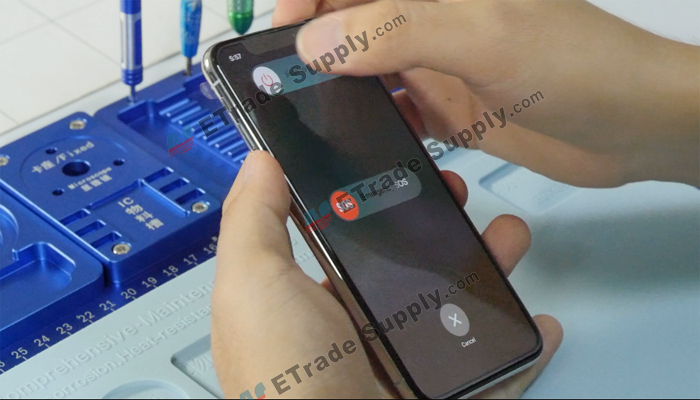
Press the Volume down and power button to turn off the iPhone X which is different from others.
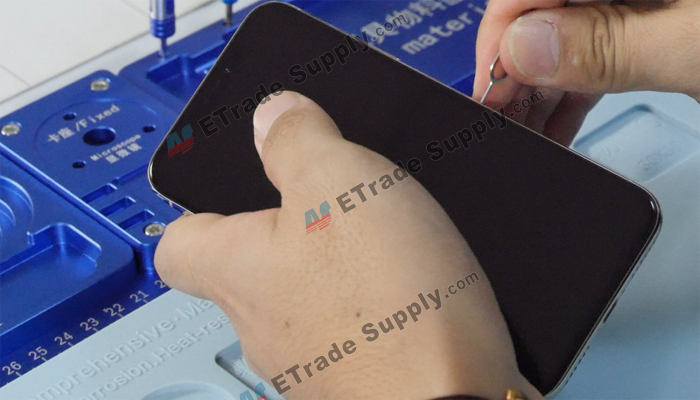
Take out the SIM Card tray with an ejection tool.
Step 2. Open the phone.
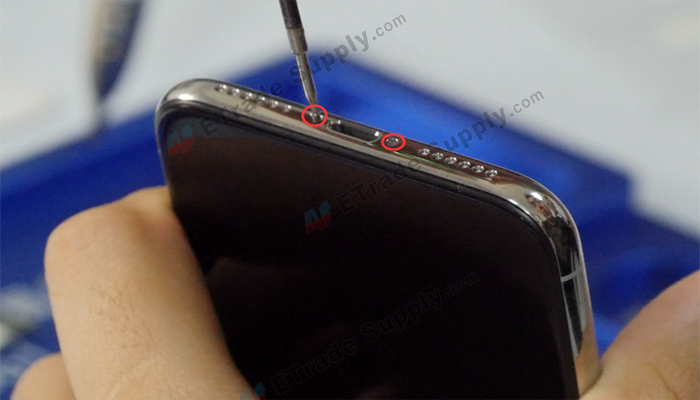
Undo 2 screws on the phone bottom with a Pentaloble screwdriver. The 2 screws are longer than before.
Heating the phone screen with a heat gun then we can gap the phone with a Suction cup separator. Inset a pry bar into the gap and slide around the phone screen edge.

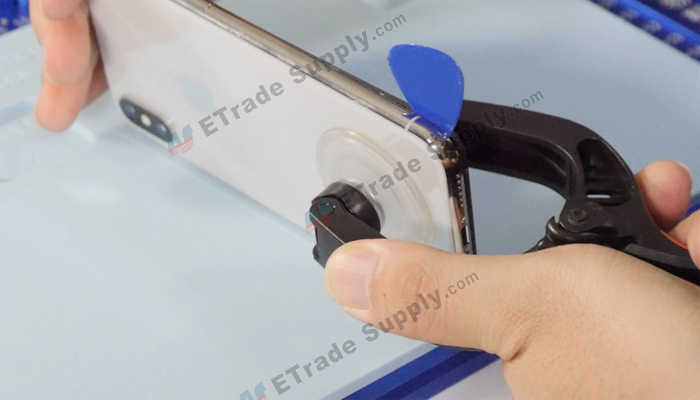
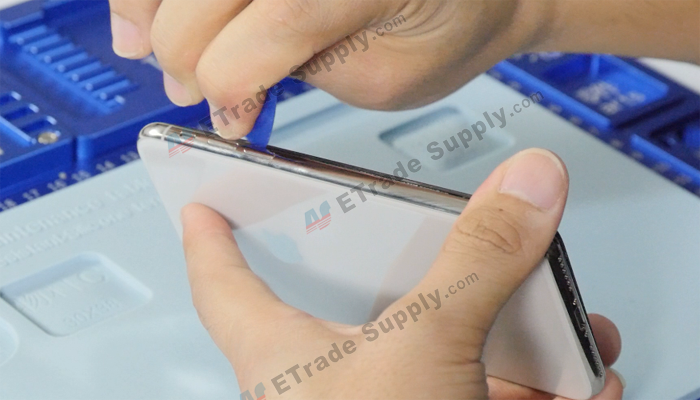
The phone can be opened like others iPhone.
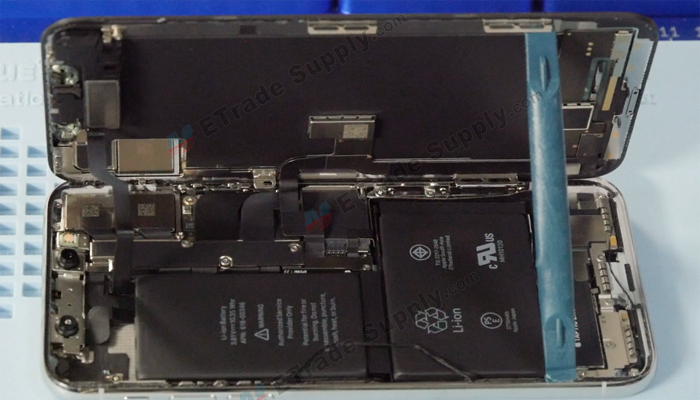
Step 3. Remove the iPhone X LCD screen.
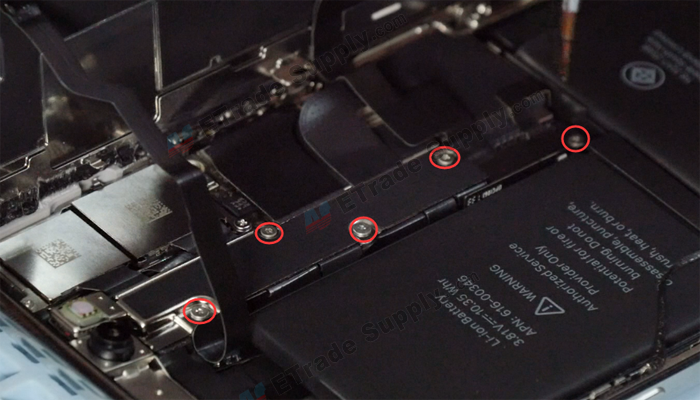
Undo 5 screws shown in the picture below with a triangle screwdriver then take out the metal retaining plate.
Release the battery/LCD screen/digitizer/ear speaker connectors with a spudger.
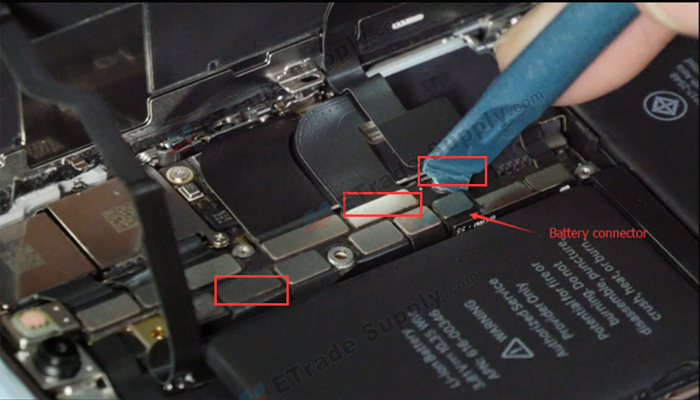
The screen was separated. The iPhone X display is a 5.8 inches Super AMOLED screen, it is different from before iPhones and there is only an ear speaker on the display.
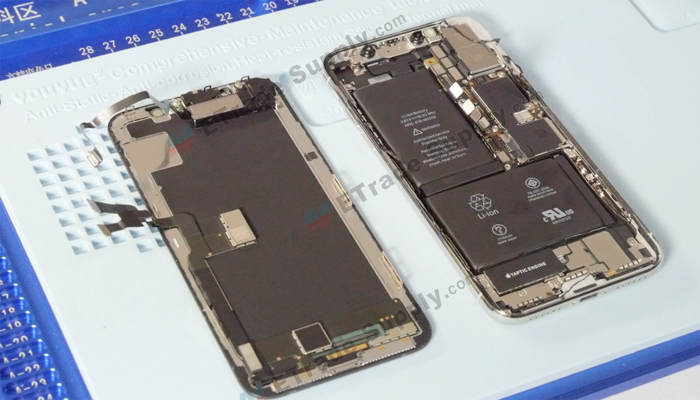
Step 4. Remove the ear speaker.
Undo 3 screws on the retaining plate with a triangle screwdriver then remove the plate. Heating the ear speaker with a heat gun will make it easier to remove the ear speaker with tweezers.

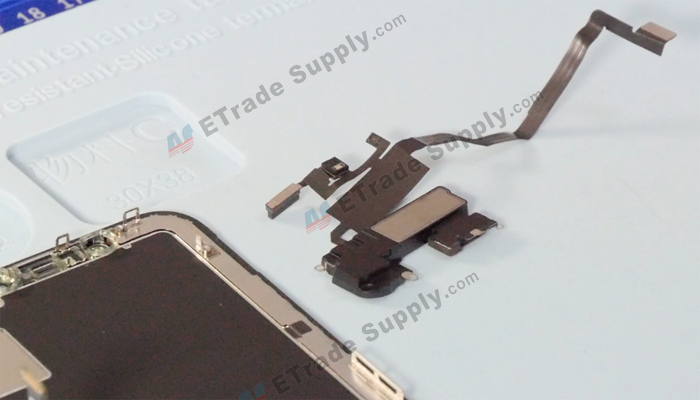
Step 5. Remove rear-facing cameras.
Undo 2 screws shown in the picture below with a triangle screwdriver, release the cameras/flashlight connectors with a spudger then we can take out the rear-facing cameras.
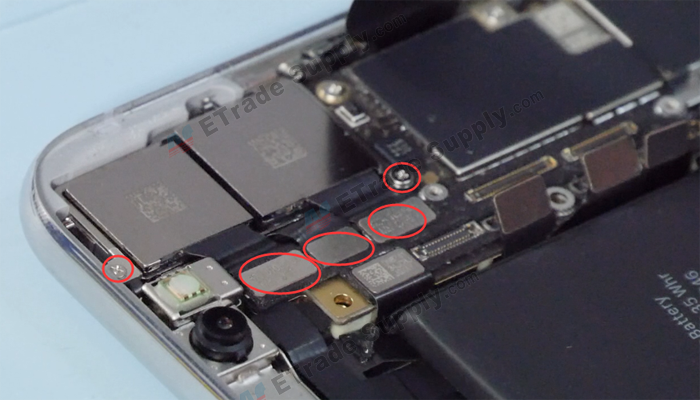
Step 6. Remove motherboard.
Release all connectors on the motherboard with a plastic spudger.
Undo 3 screws on the motherboard shown in the picture below with a triangle screwdriver then we can take out the motherboard. Unlike other iPhones, the iPhone X motherboard is made of 3 small boards.
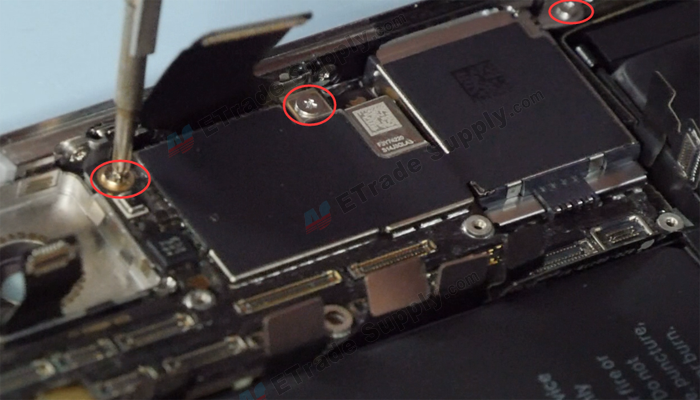

Step 7 Remove Loudspeaker and Taptic engine.
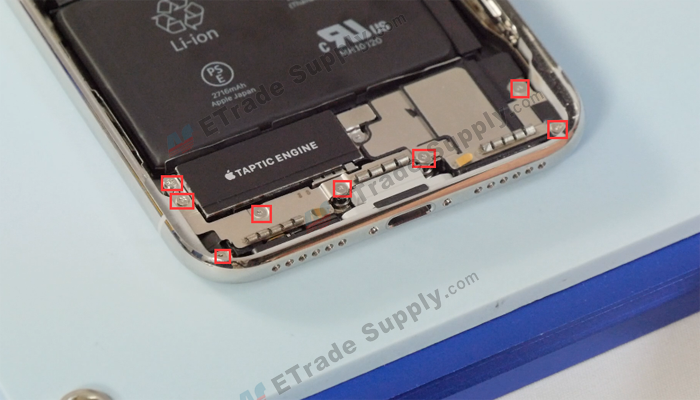
Remove 8 screws shown in the picture below with the Philip screwdriver/triangle screwdriver.
Release the connector with a spudger then we can remove the loudspeaker antenna flex cable.
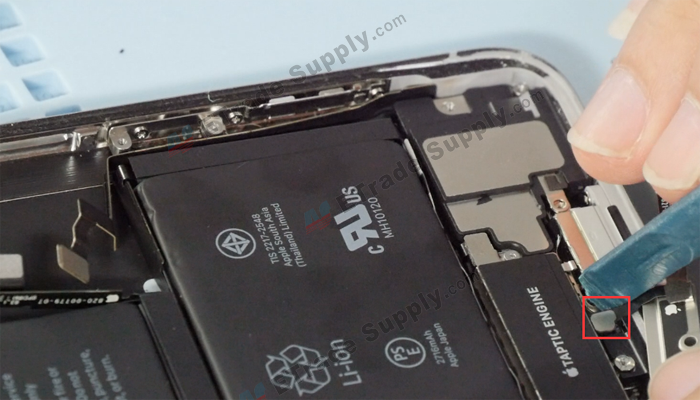

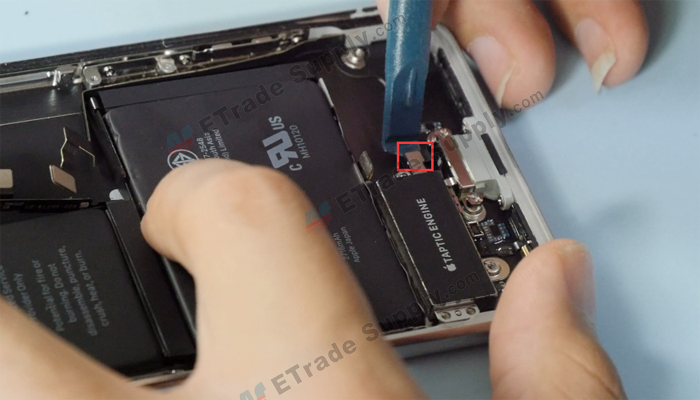
Undo 2 screws shown in the picture below with the triangle screwdriver/Philip screwdriver then we can take out the metal plate and the microphone retaining plastic. Release the loudspeaker connector then we can take out the loudspeaker and Taptic engine.

Step 8 Remove battery.
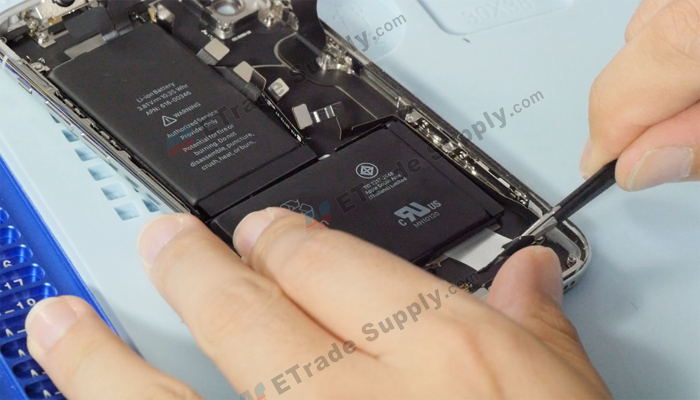
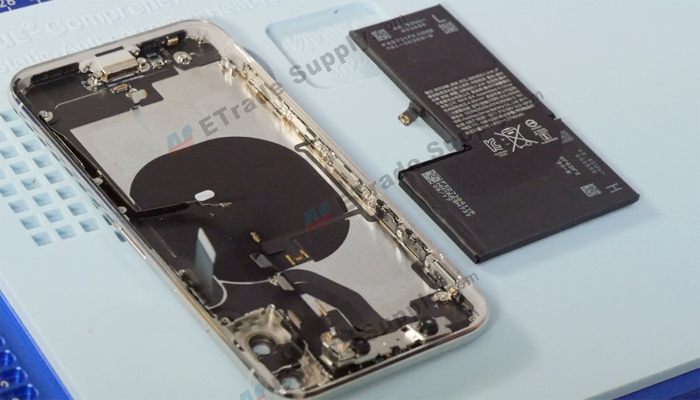
There are two batteries in the iPhone X and they are welded together like an L shape. The iPhone X battery is 2716 mAh which is much larger than iPhone 8, a little more than iPhone 8 Plus. The iPhone 8 battery is 1821 mAh and iPhone 8 plus is 2691 mAh.
Pulling out 4 battery adhesives with tweezers then we can remove the battery.
Step 9 Remove the front-facing camera.
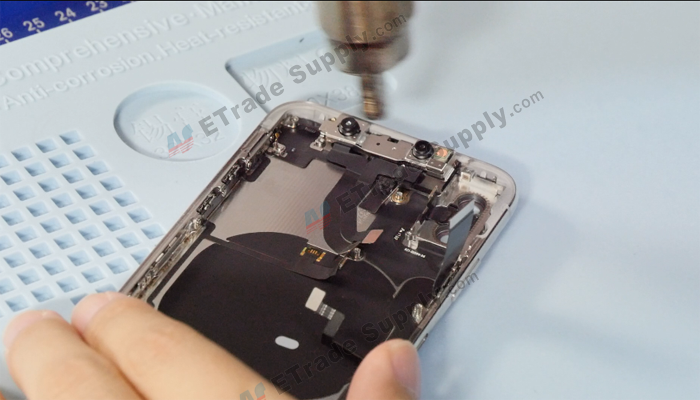
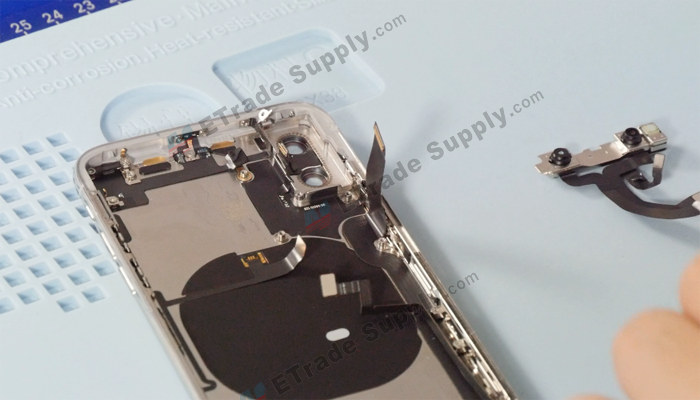
The front-facing camera and Face ID are installed in the back housing, not like the iPhone 8 which is installed on the back of the LCD screen.
Heating the front-facing camera and Face ID flex cable with a heat gun will make it easier to remove it with a spudger.
Step 10 Remove the charging port and antenna.
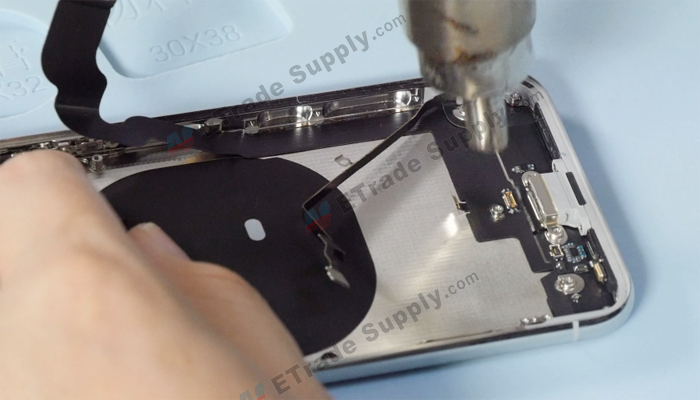
Remove 4 screws on the frame shown in the picture below with a Philip screwdriver then remove the metal retaining plate. Heating the charging port flex cable with a heat gun will make it easier to be removed with a spudger.



Step 11 Remove Wi-Fi antenna.
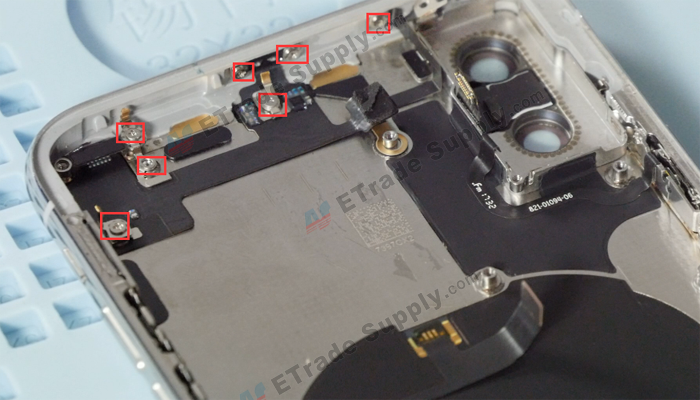
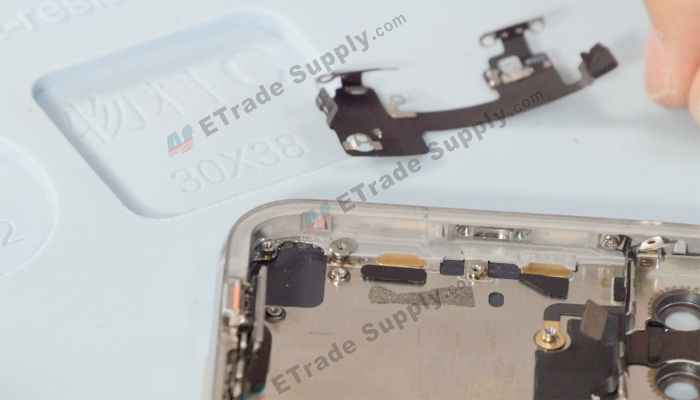
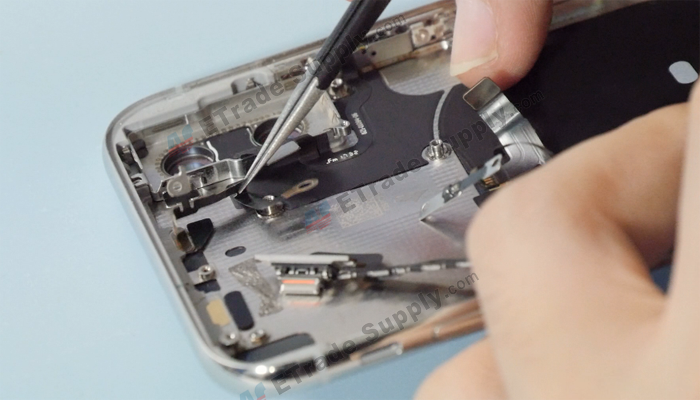
Undo 7 screws shown in the picture below with Philip screwdriver/triangle screwdriver, heating the flex cable with a heat gun then the Wi-Fi antenna and Bluetooth antenna can be removed easily.
Step 12 Remove power button flex cable.
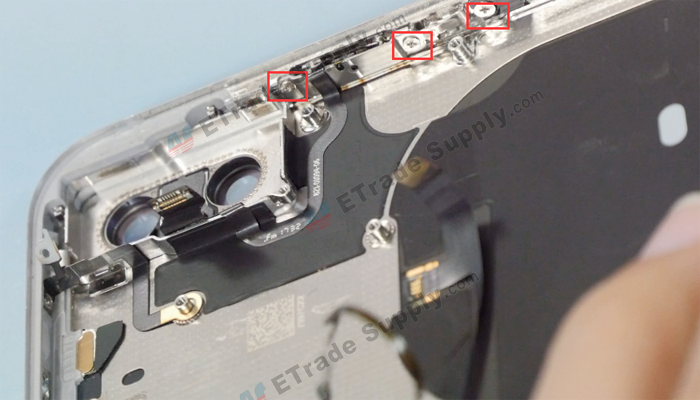
Undo 3 screws on the frame shown in the picture below with a Philips screwdriver, heating the flex cable with a heat gun will make it easier to be removed with a pry tool. The flashlight cable and the power button cable are on the same flex cable. There is a rubber gasket under the flashlight cable.
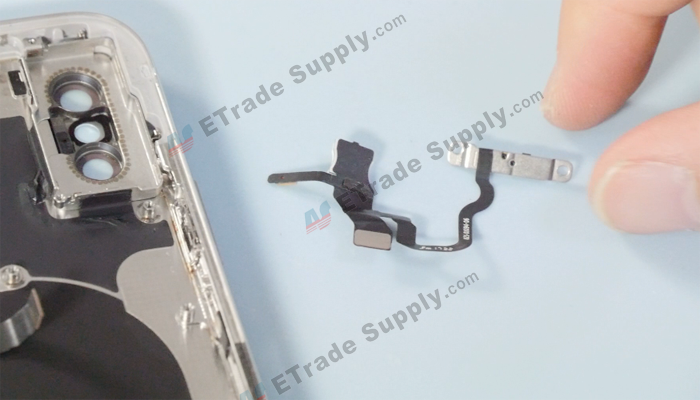
We don’t remove the wireless charging coil because it has a risk of damaging the wireless charge function. The volume flex cable is weld to the wireless charging flex cable, so we don’t disassemble it too.
iPhone X all parts here:
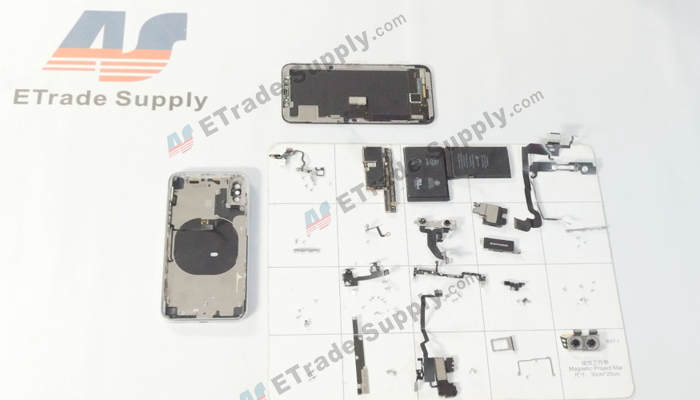
The iPhone X teardown tutorial is completed now and more details please watch our iPhone X teardown video.
Here is the iPhone X teardown video:
Any questions and suggestions about iPhone X, welcome to comment below.
You may also like:
- How to replace iPhone 8 screen, battery and charging port
- iPhone 7 Full Teardown for Screen, Battery, Charging Port Flex Replacement
- How To Disassemble/Tear Down/Take Apart iPhone 6S+
- How to Disassemble/Tear Down/Take Apart iPhone 6
- Does The iPhone X Worth To Buy Or Not?
|
|

|
|
|
|
|
|---|


RECOMMENDED PARTS
POPULAR ARTICLE
- How much does it cost to replace iPhone 8/8 Plus battery and LCD screen?
- How To Replace iPhone 8 Screen, Battery and Charging Port?
- What is the production cost of iPhone X?
- Samsung Galaxy Note 8 Teardown In 7 Steps
- iPhone X Water Damage Repair Guide (Still Work in 2019)
- How Much Does It Cost To Replace An iPhone XS Display?
- iPhone X Explosion: 7 Small But Important Things To Note
- 7 Ways To Fix Your iPad Not Charging In 2018
- iPhone 7 Screen Replacement | iPhone 7 Repair
- Which Parts of iPhone X and iPhone XS Are Exchangeable?
- iPhone X, XS, XS Max, and XR Battery Comparison
- How To Fix iPhone XS/XS Max, And XR Bluetooth Connection Issue
- Apple Will Fix the iPhone 8/8 Plus/X Auto Brightness Issue in iOS 12
- iPhone got exploded too?! How to protect your phone from battery explosion
- HTC 10 DIY Teardown for screen, charging port, battery replacement
- 6 Quick Tips To Distinguish Between Real And Fake iPhone SE
- Analysis on: Are China made LCDs for iPhone 5S Compatible with iPhone SE?
- How to Replace the Galaxy S7, S7 Edge Battery Replacement
- How to Disassemble the Galaxy S7 LCD Assembly to Replace Screen, Charging Port and Home Button
- How to Repair Samsung Galaxy S7 Edge Cracked Screen
- How to Tear Down/Disassemble the Galaxy S7 for Screen Replacement
- How to Fix Phone Gets Hot and Battery Drains Fast
- Xperia Z5 Premium USB Charging Port Replacement Tutorial
- How to Replace Your Broken Sony Xperia Z5 Premium Screen Step by Step Guide
- 15 Tips to Improve Your Galaxy Note 5’s Battery Life
- How To Replace A Cracked Motorola Droid Turbo 2 Screen
- How To Fix iPhone 6S Auto Shutdown When It Still Has Battery?
- How To Replace A HTC One A9 Cracked Screen
- How to Distinguish the Fake Apple Earpod from the Real One
- How to Replace the LG V10 Screen in 5 Steps
- How To Solder/Replace A Samsung Galaxy or iPhone Charging Port
- The Cost of Repairing a Cracked Galaxy S6, S6 Edge Screen
- How To Fix Cracked Xperia Z5 For Screen Replacement
- What’s Need to Be Prepared As a Startup Cell Phone Repair Shop
- *Update* The Root of Differences among Copy iPhone LCDs: Structure
- Important Info: Pay Attention To Defective Recycled iPhone LCDs
- How to Replace Galaxy Note 5, S6 Edge Plus Battery
- Are The Flood of New High Copy iPhone LCD Screens as Good as The OEM Ones?
- iPhone 6+ and iPhone 6S+ Screen Comparison Report
- How to Recover Photos and Data with Broken Screens
- How To Identify Different LG G4 Model Numbers
- How to Fix Cracked iPhone 6S for Screen Replacement
- Cost of Repairing a Damaged Screen on the LG G4
- How To Fix LG G4 Digitizer Touch Screen Issue
- As a Newbie, What You Should Know About Jailbreaking
- How To Tear Down/Disassemble Galaxy S6 Edge Plus For Screen Replacement
- 90% Of People Don’t Know These Cellphone Battery Information
- Insider Tips to Save Your Water-damaged Device
- How to Set Up ETrade Supply’s Adhesive Dispenser Robot
- Top 10 iPhone 6 Problems and Solutions
- How To Fix Vertical Lines On An iPhone Screen After Replacement
- How to Replace Sony Xperia Z3+ Screen/Screen Replacement Guide
- How To Disassemble/Tear Down Sony Xperia Z3+
- How to Assemble Small Parts on iPhone 6 LCD Screen Assembly
- Reasons Behind & Solutions for iPhone 6 Frame and LCD Separation Issues
- How to Replace The LG G4 Charging Port
- How to Replace the Cracking LG G4 Screen in 10 Minutes
- How To Replace An Oneplus One Cracked Screen
- iPhone 5 LCD Screen Assembly Small Parts List
- How to Replace the HTC One M9 Charging Port
- How to Replace HTC M9 LCD Screen Assembly
- Top 5 Most Common iPhone 6 Issues You May Come Across
- How To Tear Down The Samsung Galaxy S6 In 10 Steps
- The Cost Of Repairing A Cracked Nexus 6 Screen
- How To Repair A Nexus 6 Cracked Screen
- How To Disassemble Nexus 6 In 10 Steps
- The Cost Of Repairing A Broken iPhone 6 Screen
- Five Minutes Work to Replace Your iPhone 6 Plus Broken Screen
- How to Repair a Cracked Samsung Galaxy S5 Screen
 How much does it cost to replace iPhone 8/8 Plus battery and LCD screen?
  How To Replace iPhone 8 Screen, Battery and Charging Port?
  What is the production cost of iPhone X?
  Samsung Galaxy Note 8 Teardown In 7 Steps
  IOS 17.4 official version pushed to block battery vulnerability
  Is the Chinese-made rear case for the iPhone 15 series going on the market?
  New products coming:USB to MFI Lightning Cable
  Big BUG of iPhone 15
  How Chinese celebrate Christmas?
  Disadvantages of iPhone 15 Standard Edition
  Rumors about the Samsung Galaxy S24 Ultra
  TWS Wireless Bluetooth Headset: Connect Your Wireless World
  iPhone 15 Black Screen Self-Rescue Guide
  Comparison of LCD screens of different mobile phones
  Successfully submitted!
Hi like your site. Do you sell iPhone tool kit to break iPhone apart
Also need battery replacement in iPhone 5 can you repair them
Hi! We have iPhone repair kits in our store. Please check this out here:
https://www.etradesupply.com/accessories/accessories/repair-tools.html
We also have original new iPhone 5 battery for sale but we don’t provide iPhone repair service. We will sent your the repair guide video if you purchase.
https://www.etradesupply.com/oem-apple-iphone-5-battery.html